Statuses and priorities
Statuses are fully customizable per vault. Priorities are a fixed set. Both are used everywhere — filters, sort order, kanban columns, the gantt left panel.
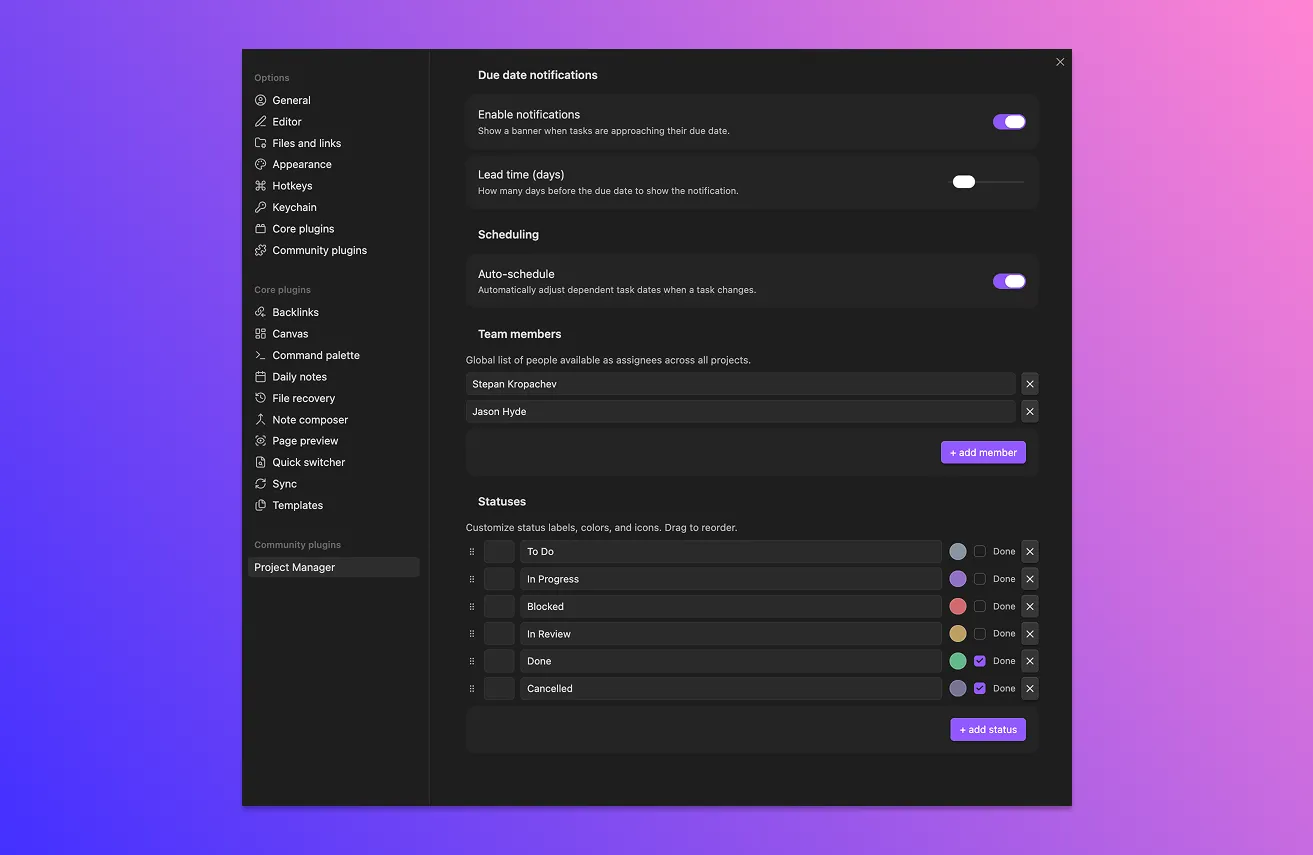
Default statuses
| ID | Label | Marked as “done” |
|---|---|---|
todo | To do | no |
in-progress | In progress | no |
blocked | Blocked | no |
review | In review | no |
done | Done | yes |
cancelled | Cancelled | yes |
Each status has a label, a color (used for badges and the kanban column header), an optional icon, and a complete flag.
The complete flag matters for two behaviors:
- Notifications are suppressed for tasks whose status is marked complete.
- Auto-schedule ignores tasks whose status is marked complete when shifting dependent dates.
That’s it. Status IDs themselves aren’t special — the plugin doesn’t hard-code “done” anywhere. The “done” flag is what counts.
Customize statuses
Under Settings → Project Manager → Statuses:
- Reorder by dragging the handle on the left. Order in this list = order in kanban columns and the table view’s status sort.
- Edit the label, icon, or color by clicking on the row.
- Toggle the “complete” flag for any status.
- Delete a status with the trash icon.
- Add a new status with + add status.
What happens when you delete a status
Tasks that were using the deleted status get remapped to the first status in the list. The mapping is automatic — no prompt, no migration step.
If you want to keep history clean, change those tasks’ status manually before deleting.
Priorities
Priorities are a fixed set: critical, high, medium, low. You can’t add, remove, or rename them in the current version.
Why fixed? They’re used for the priority color rail on kanban cards and a few small UI affordances that depend on having a known set. Status is the open-ended customization point.
Priorities have:
- A label and a color (currently not user-editable in the UI).
- A position in the sort order: critical → high → medium → low.
Where to go next
- Kanban view — one column per status.
- Settings reference — the full status editor.
Tips
Keep the status list short. Five to seven is plenty. Long status lists mean long kanban scrolls and harder filtering.
If you want a “won’t fix” or “deferred” outcome, add a status with the “done” flag turned on. It’ll behave like done for notifications and scheduling, without using the literal “Done” label.